Download TikForge.
Your whole live panel in a single window: Actions & Events, games, overlays and TTS, always up to date on its own.
Ready in three steps.
A guided installer like the ones you already know: choose, click next and open the app.
Download and open
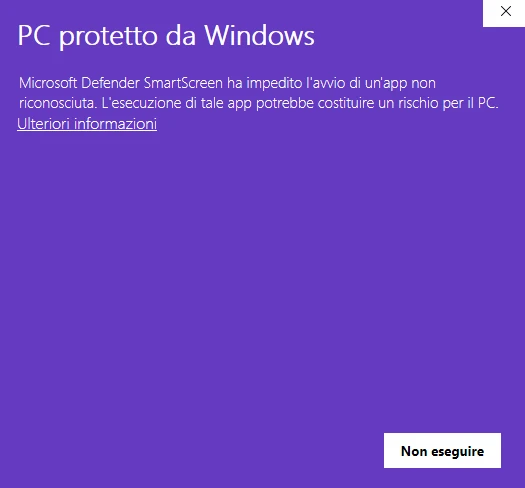
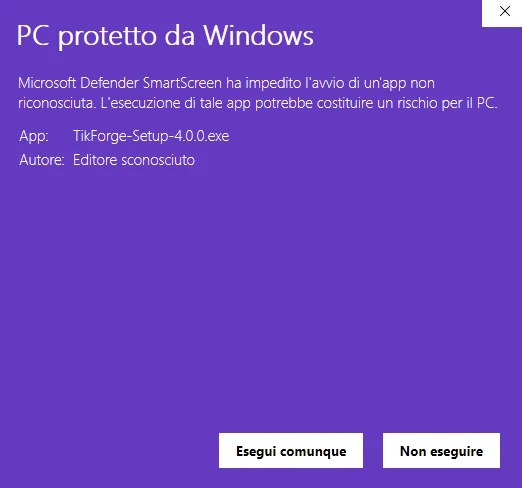
Open the downloaded TikForge-Setup file. If Windows shows “Windows protected your PC”, click “More info” and then “Run anyway”.
Install
Choose the language and the folder, let the bar finish and decide whether to add TikForge to the Desktop and the Start menu.
Log in and go live
Sign in with your TikForge account. From then on the app updates itself: when a new version comes out it downloads it and restarts.
It’s normal the first time.
Windows 10 or 11
64-bit version. About 400 MB of free disk space needed.
Always up to date
New versions arrive on their own when you open the app, no reinstalling.
Your account
Sign in with the same account as the website: profiles, overlays and settings follow you.
Straight from us
The installer comes straight from the official TikForge releases.
Don't have a subscription yet?
The app is included: pick the length you prefer and sign in with the same account.